Frequently Asked Questions
Is CraftyAI free?
Yes, the Free tier is free forever. Pro and Enterprise tiers add higher rate limits and custom prompts for servers that need more capacity.
Which Minecraft versions are supported?
- Plugin (Spigot, Paper, Folia, Purpur): 1.8 through 1.21.x & 26.x
- Mod (Fabric): 1.20.4 through 1.21.1, plus 26.x (26.1, 26.2, 26.3+)
- Mod (Forge / NeoForge): Forge 1.20.4 (
craftyai-forge) and 1.20.6 (craftyai-forge-1206) as separate jars, NeoForge 26.x
Which server software works with the plugin?
Spigot, Paper, Folia, and Purpur all work. The same JAR runs on all of them.
Can I use my own AI provider?
Yes. With BYOK (Bring Your Own Key), you can connect any external AI provider or local model (OpenAI, Google Gemini, Anthropic Claude, Groq, xAI Grok, OpenRouter, Ollama, LM Studio). Your server's prompts go directly to your chosen provider or local endpoint instead of consuming default cloud tier request quotas.
See the BYOK guide for setup instructions.
Does CraftyAI sell my data?
No. We don't sell player data, chat content, or learned knowledge. The data we collect (described in our Privacy Policy) is used to run the service and improve abuse detection.
How do I disable telemetry?
- Plugin: Set
enable_metrics: falseinconfig.yml - Mod: Set
telemetry_enabled: falseincraftyai.json
Telemetry is just a heartbeat ping every 3 minutes. Disabling it doesn't affect AI features.
Can players abuse the AI to grief the server?
CraftyAI has several protections:
- Player cooldowns prevent chat spam
- A blacklist blocks dangerous items (bedrock, command blocks, spawners)
- Destructive actions (gamemode changes, mob kills, command execution) require operator permissions
- Destructive actions also require an in-game confirmation before running
If a player does get a destructive action approved, they can only affect their own player state by default. Server-wide effects (like gamemode changes) require OP or crafty.actions.gamemode permission.
How do I upgrade my tier?
See Tiers & Subscriptions. Join the official Discord, open a subscription ticket and ask an authorized moderator to confirm the offer and redemption instructions. /crafty pro help also shows the Discord request workflow.
Can I change the AI's name?
Yes. In your config:
- Plugin:
ai.nameinconfig.yml - Mod:
ai_namein the settings screen orcraftyai.json
The AI will respond to whatever name you set, plus all the aliases you've configured.
What AI model does CraftyAI use?
CraftyAI runs on an AI engine built and maintained by DemonZ Development. The model and infrastructure are closed source. We tune the system for gameplay, action execution, and game state reasoning.
Can I see my server's usage?
In-game: /crafty status shows connection state and recent request count.
In Discord: /my-sessions shows every server linked to your account with daily token usage and request count.
How do I get support?
Join our Discord and open a ticket. We respond within a day, usually faster.
Is the source code available?
The client plugins and mods are closed source. The backend is also closed source. We may open-source specific components in the future, but there's no public repo right now.
Can I run CraftyAI offline?
Partially, in three ways:
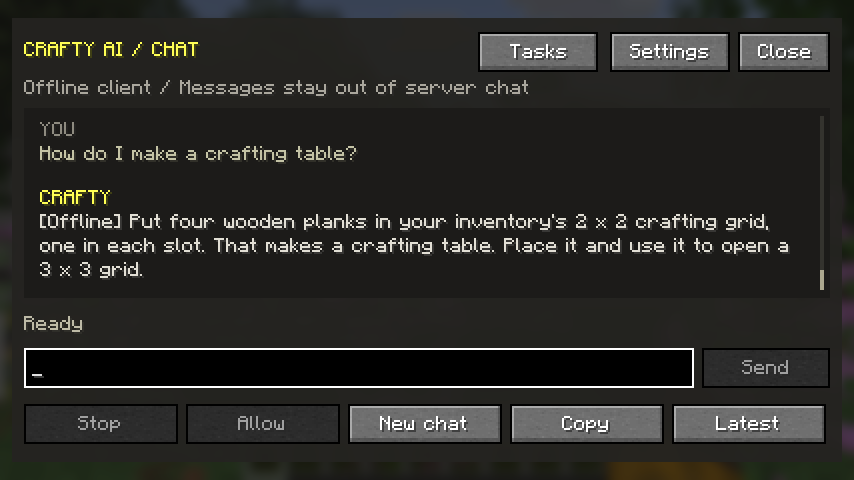
- Built-in client replies: The 1.4.1 chat window answers common recipes, survival questions and questions about your current world without a key. Press J to open it. Choosing local mode does not queue questions; a failed request to a configured online provider reports whether it was queued.
- Local mode: Use M → General → Connection mode: Offline → Save & close, or set
force_local_mode: trueincraftyai.json. The server plugin usesai.force-local-mode: trueinconfig.yml. - Local AI provider (true offline AI): Point a custom provider at an OpenAI-compatible server on your own machine (Ollama, LM Studio, GPT4All). Requests go directly to it — the CraftyAI cloud isn't involved, so full AI chat, actions, and scanning work with zero internet.
See the Offline & Singleplayer guide for details.
How do I report a bug?
Open a ticket in Discord with:
- What you did
- What happened
- What you expected to happen
- Server version, plugin/mod version, and Minecraft version
- Relevant log output (redact any API keys before posting)