Fabric / Forge / NeoForge Mod Installation
This guide covers the 1.4.1 mod jars for Fabric, Forge and NeoForge. Use the jar for your exact Minecraft version and loader.
Requirements
| Requirement | Version |
|---|---|
| Minecraft | Exact targets from 1.20.4 through 26.3; see the download table |
| Java | 17 or newer; Java 21 required for MC 1.20.5+ / Forge 1.20.6 (Java 25 required for MC 26.x execution) |
| Loader | Fabric + Fabric API, Forge, or NeoForge |
Install on Fabric
- Open the 1.4.1 release and choose
craftyai-fabric-mc<version>-1.4.1.jarfor your Minecraft version. - Download Fabric API for your Minecraft version.
- Put both JARs into
.minecraft/mods/(or your server'smods/folder). - Launch the game.
For Minecraft 26.3, use craftyai-fabric-mc26.3-1.4.1.jar and Java 25. Each Fabric jar declares one exact Minecraft version.
Install on Forge / NeoForge
- Open the 1.4.1 release.
- Choose
craftyai-forge-mc<version>-1.4.1.jarorcraftyai-neoforge-mc<version>-1.4.1.jarfor your installed loader and exact Minecraft version. - Put the JAR into
.minecraft/mods/(or your server'smods/folder). - Launch the game.
For Minecraft 26.3 with NeoForge, use craftyai-neoforge-mc26.3-1.4.1.jar and Java 25. This set has no Forge 26.3 target; use the download table to check available combinations.
Note: Forge mods are version-locked — a jar built for 1.20.4 will not load on 1.20.6 and vice versa. Always use the jar that matches your exact Minecraft version.
Configure from the in-game menu
Press M in-game (all mod loaders — rebindable in Controls) to open the CraftyAI settings panel. On first launch, the mod generates an API key for you and fills it in automatically. You don't need to do anything else.
The settings panel has:
- API Key — Auto-filled on first launch
- AI Display Name — Change what the AI is called (default: "Crafty")
- Mode — Cloud (online AI) or Local (offline fallback)
- Custom Provider — Use your own AI key instead of ours
- Agentic Tasks — Let the AI change time, weather, give items, etc.
Configure by editing the file
Client chat (1.4.1)
Press J or run /craftyclient chat to open the conversation window. Type directly and press Enter; an alias is only needed in Minecraft player chat. The window uses your client's connection settings in singleplayer and multiplayer.
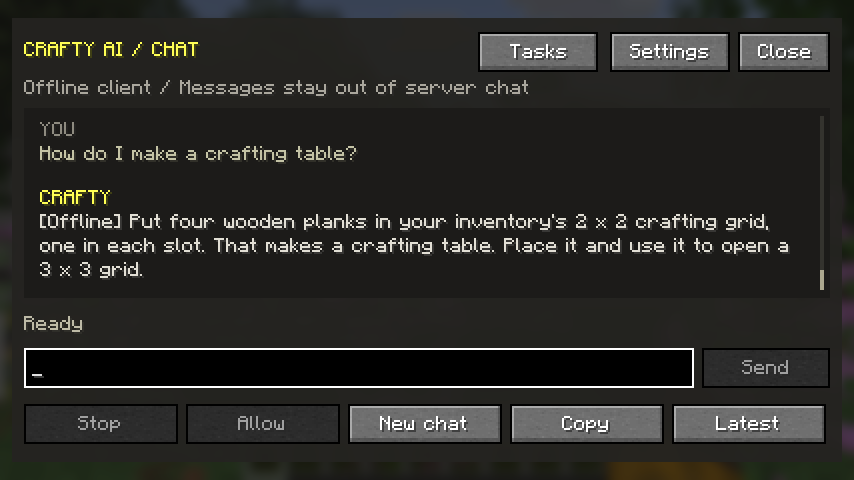
For offline replies, choose General → Connection mode: Offline → Save & close in the M menu. See Offline & Singleplayer for supported questions and local providers.
Configuration file
If you'd rather edit the config directly, it's at config/craftyai.json:
{
  "api_key": "your-api-key",
  "ai_name": "Crafty",
  "ai_enable_actions": true,
  "allow_block_scanning": true
}
The fields not shown here have sensible defaults. You only need to set the key and your AI name in most cases.
Commands
| Command | What it does | Platform Support |
|---|---|---|
/crafty | Show mod info | Mod & Plugin |
/crafty status | Check connection | Mod & Plugin |
/crafty ask <question> | Ask AI privately | Mod & Plugin |
/crafty scan | Scan nearby area | Mod & Plugin |
/crafty confirm | Confirm a destructive action | Mod & Plugin |
/crafty link | Link server to Discord (admin) | Mod & Plugin |
/crafty reload | Reload configuration (admin) | Mod & Plugin |
/crafty pro help | Show Pro key instructions | Mod & Plugin |
/crafty pro status | Show current subscription tier | Mod & Plugin |
/crafty pro redeem <key> | Redeem a Pro key | Mod & Plugin |
/craftyclient | In-game client config screen | Fabric/Forge Client |
/crafty memory | View stored RAG memories | Spigot/Paper Plugin |
/crafty forget [n] | Forget a specific memory or all | Spigot/Paper Plugin |
/crafty privacy <on|off> | Toggle server-wide RAG memory opt-out | Spigot/Paper Plugin |
/crafty mode <local|cloud> | Toggle forced local offline mode | Spigot/Paper Plugin |
/crafty prompt set <text> | Set custom AI system prompt | Spigot/Paper Plugin (Pro) |
Need an API key?
See Getting Your API Key.