Vision Scanner
Point at something and ask the AI about it. The AI reads what you're looking at and gives you tips.
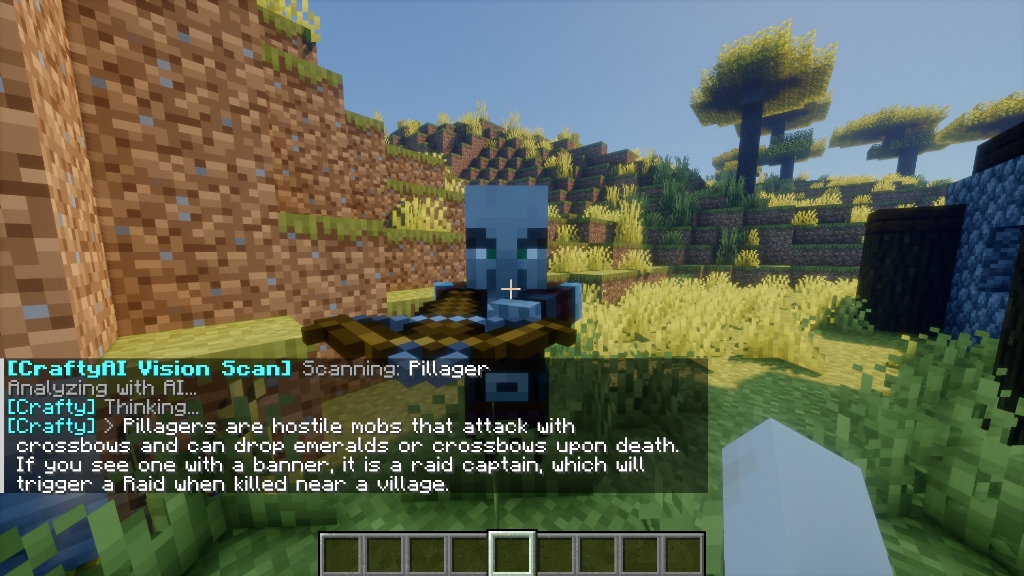
How to use it
Plugin (Spigot / Paper)
- Hold a Compass in your main hand.
- Look at a block or entity.
- Right-click to scan.
Mod (Fabric / Forge)
- Look at a block or entity.
- Press the
Vkey. You can rebind it in Minecraft's controls menu if you want a different key.
After scanning, the AI responds in chat with details about what you looked at.
What the AI tells you
Scans are private by design: the raw scan data (positions, biome, nearby blocks/mobs, your stats) is sent to the AI only — it is never printed to chat. You just get the AI's natural-language answer about what you scanned.
For entities (mobs, animals, players)
- Health and max health
- Armor and weapons they're wearing
- Active potion effects
- Special states (a charged creeper, a tamed wolf, a cleric villager, a baby zombie, etc.)
- The entity's name if it has a custom one
For blocks
- Exact block type
- Block states (whether a furnace is lit, whether wheat is grown, which way a piston is facing)
- Container contents (what's inside chests, furnaces, etc.)
A few examples
Scanning a damaged Iron Golem:
"That's an Iron Golem. It has 24 out of 100 health and is heavily damaged. Right-click it with Iron Ingots to heal it."
Scanning a fully grown wheat crop:
"This wheat is age 7 and ready to harvest. Break it to get wheat and sometimes seeds."
Scanning a creeper:
"That's a Creeper. It will explode if it gets close to you. Back up, or use a bow from a distance."
Permissions
The Vision Scanner works on all tiers. By default, any player can use it.
If you want to restrict it to certain players (for roleplay servers, build servers where scanning mobs is unfair, etc.), set enable_actions: false in your config and grant crafty.actions to specific players via LuckPerms.
Cooldown
The scanner has a 5-second cooldown between uses by default. You can change this with vision.cooldown in your config.