Offline & Singleplayer
CraftyAI can answer common Minecraft questions without internet or an API key. For longer conversations with a language model, connect a provider running on your computer.
Client chat window (1.4.1)
Press J or use /craftyclient chat. Write your question and press Enter or Send. This works in singleplayer and multiplayer, and messages stay out of player chat. The window uses your client's settings.
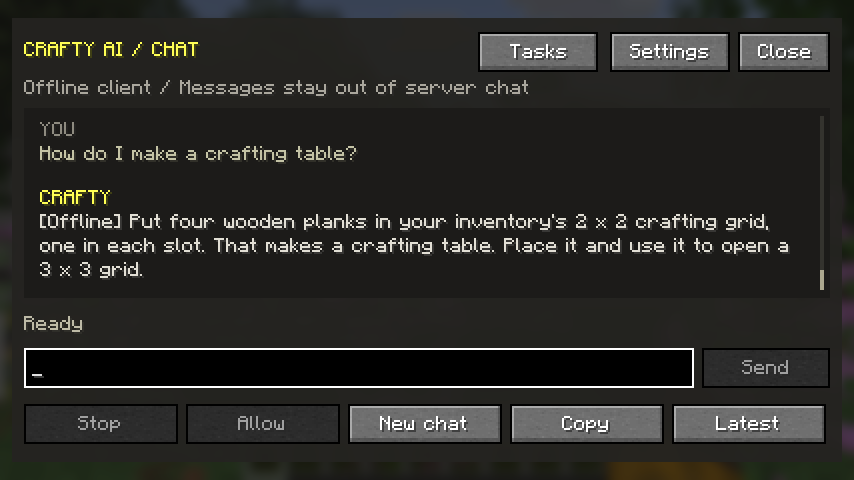
Press M, open General, choose Connection mode: Offline, then Save & close to use the built-in assistant. Local mode works without a key and sends no AI requests.
The client can answer common recipes and survival questions, and read your current time, weather, biome, dimension, coordinates, health, hunger and held item. Try “How do I make a crafting table?”, “Where am I?” or “What am I holding?”. It can also reuse previously learned replies for the same account. Current-world answers take priority over saved replies.
The refreshed private 26.3 downloads also answer “What version are we on?” from the running game. That question works without an AI request in both offline and online mode; it does not report the latest global release.
The built-in assistant uses fixed answers. It cannot run game actions or answer every question. Unknown questions ask you to connect a provider; choosing local mode or having no provider does not queue questions.
Local reminders work in Offline mode. In the refreshed 26.3 client, “remind me to drink water after 3 seconds” creates a one-time task without an AI request. Use Tasks to list or cancel it. Game commands remain disabled in Offline mode, and local timers end when you leave the world or restart.
New chat clears the transcript, draft and model history. Learned answers remain under config/craftyai/players/<uuid>/, alongside the encrypted retry queue. Leaving the connection clears the visible conversation. Older installation-wide caches are kept on disk but are not imported into an account.
Singleplayer worlds
The Fabric and Forge mods include a client-side chat module that intercepts @crafty (or your configured alias) messages only in singleplayer worlds. On a multiplayer server the client module stands down and the server-side plugin handles the chat instead.
In singleplayer you get the full experience:
- Natural AI chat with your AI companion
- Vision scanning, block scanning, and game state awareness (biome, time, weather, health)
- Agentic actions (time, weather, gamemode, items, teleport) — gated by your cheats/OP setting
- The settings screen (press M) with API key, AI name, and mode toggles
Online requests go to the configured CraftyAI gateway or custom provider. Built-in local replies do not use the network.
The Spigot/Paper plugin is server-side software. It runs on a dedicated server, so "singleplayer" doesn't apply to it — but the offline fallback below does.
When you lose internet (or have no API key)
If there's no connection to the CraftyAI gateway, or no API key is configured, the mods and plugin automatically switch to LocalBrain — a built-in offline assistant.
The new client window marks built-in replies with [Offline]. Older player-chat and plugin paths use these prefixes:
| Prefix | Meaning |
|---|---|
[OFFLINE] | No API key or the connection failed. Set a key to go online. |
[FORCED-LOCAL] | You enabled Local Mode on purpose (see below). |
LocalBrain can handle a few common things without the cloud:
- Greetings and small talk
- Basic Minecraft tips and game knowledge
- Jokes and light banter
- Simple status questions
The client includes specific crafting and survival answers and reads current player/world details. The plugin has its own knowledge corpus. Both use fixed local answers and saved text; they cannot run actions in built-in local mode.
Enabling Local Mode on purpose
If you want to force the offline assistant even when you have a valid key:
- Mod: Settings (M) → General → Connection mode: Offline → Save & close, or set
force_local_mode: trueincraftyai.json - Plugin:
ai.force-local-mode: trueinconfig.yml
Queued requests are saved for later
When a configured online provider cannot be reached, the client displays a local reply and reports whether the question was queued. The encrypted queue holds up to 50 questions and survives restarts. A full queue is reported in the conversation.
After a successful online reply, the client retries a small batch of queued questions. Deliberately choosing local mode does not queue questions for later network access. Server retry queues belong to the original player's UUID; private replies are not learned into a shared cache.
True offline AI: run a local provider
For language-model replies without internet, run an OpenAI-compatible provider on your computer, then enter its URL, installed model ID and key in Provider. Choose Connection mode: Online in General to use it; Offline selects the built-in assistant even with a provider configured.
Mod (craftyai.json or the settings screen):
{
  "force_local_mode": false,
  "custom_provider_enabled": true,
  "custom_provider_url": "http://localhost:11434/v1",
  "custom_provider_key": "ollama",
  "custom_provider_model": "your-installed-model"
}
Plugin (config.yml):
server:
  custom_provider:
    enabled: true
    url: "http://localhost:11434/v1"
    api_key: "ollama"
    model: "your-installed-model"
When a custom provider is enabled, the client sends requests directly to that endpoint (/v1/chat/completions) — the CraftyAI cloud is not involved at all. This is the only way to get full, real LLM responses while completely offline.
Comparison
| Scenario | AI chat | Actions | Vision / scan | Notes |
|---|---|---|---|---|
| Singleplayer, online, key set | Full AI | Yes | Yes | Best experience |
| Server, online, key set | Full AI | Yes | Yes | Standard setup |
| Built-in local mode | Recipes, tips, current-world answers | No | No | No AI requests; no retry queue |
| Failed online connection | Local fallback | No | No | Queue status shown in conversation |
| Offline + local provider | Full AI (local) | Yes | Yes | Requires Ollama/LM Studio etc. |
See the BYOK guide for more on custom providers.