Natural Chat
Players talk in Minecraft chat, the AI answers. No slash commands to memorize.
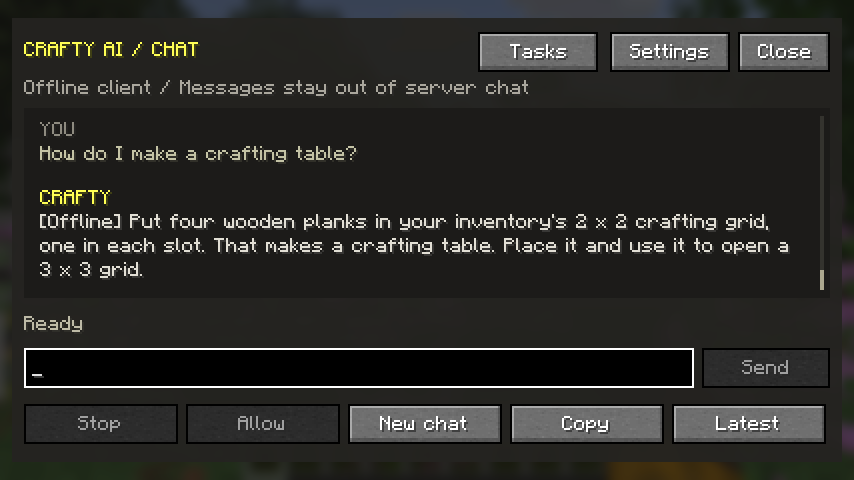
Client chat window (1.4.1)
With the client mod installed, press J or run /craftyclient chat to open CraftyAI's own conversation window. The key can be changed in Minecraft's Controls menu. Write your question directly and press Enter or Send; you do not need crafty or @crafty in this window. The existing player-chat trigger is still available.
Questions and replies in this window stay out of server chat. They use your client's connection settings, cooldown, conversation history, and offline assistant. Online messages still go to the configured AI service. Multiplayer game actions continue to require the server's permissions, and server-controlled scans use the server command.
Scroll with the mouse wheel or Page Up/Page Down; Latest returns to the newest reply. Copy copies the conversation, New chat clears the current transcript and conversation history, and Settings opens the connection settings. Closing the window keeps the draft and any pending response so you can reopen it. Leaving the connection clears the transcript and draft.
Stop discards a pending reply and cancels further actions. When a game action needs confirmation, its description appears in the conversation and Allow approves that specific step. Closing the window does not approve an action.
October 1 client follow-up — 26.3
The refreshed private 26.3 downloads animate the thinking label and show elapsed time for a slow answer. Ordinary singleplayer chat also shows a thinking indicator in the HUD. Connection failures and slow replies have separate timeout messages. “What version are we on?” reads the running Minecraft version directly, including in online mode. The refreshed Fabric/NeoForge 26.3 downloads include this behavior; 12 selected scheduling games cover each maintained adapter. Other release jars retain their earlier builds.
The October 2 client update adds Tasks for local reminders and scheduled game actions. Try “remind me to drink water after 16 seconds,” “repeat time set day every 3 minutes,” or “heal me after 5 seconds.” Explicit reminders and day/night or clear/rain timers are parsed without AI. Other supported client actions can be proposed by AI and are listed only after the game registers a real task ID.
One-time delays start at 1 second; repeats start at 10 seconds, with a 24-hour maximum and 10 tasks per player. Game tasks require singleplayer commands and enabled actions; each destructive occurrence needs approval when confirmation is enabled. Timers run without another AI request per occurrence and end when leaving the world. Use Tasks or /craftyclient tasks, then /craftyclient tasks cancel local-1 to cancel one. The normal connection needs the matching manually deployed Worker source for reliable AI proposals; the client update alone does not deploy it. Spigot keeps its four local time/weather commands. See the verification and rollout report.
On multiplayer servers, the ordinary chat trigger uses the server's Crafty integration. The J-key window uses your client's connection settings; it does not send questions into the server's Crafty chat handler. Server permissions still apply to game actions.
Offline learned answers and queued questions are stored per player UUID. The older shared installation cache is kept on disk but is not automatically imported; questions queued there must be resubmitted. New chat clears the visible conversation, while learned offline answers remain available to that account.
For built-in recipes, current-world answers and a provider running on your computer, see Offline & Singleplayer.
How it works
A player types a message that contains one of the AI's aliases (or the configured prefix). The AI reads the message and responds in chat for everyone to see.
The default aliases are crafty, craftyai, ai, and helper. You can change or add to the list in your config.
A few examples
Player: crafty how do I find diamonds?
Crafty: Strip mine between Y -50 and Y -64. Branch mining is more efficient
        if you want to avoid lava.

Player: @ai what is this biome?
Crafty: You're in a Mangrove Swamp. Watch for mud and mangrove propagules
        in shallow water.

Player: helper, where is the nearest village?
Crafty: Running /locate... Found a village 380 blocks northeast.
Configuration
You can tune how players trigger the AI:
- aliases: The names the AI responds to. By default:
crafty,craftyai,ai,helper. - prefix: An optional character before the alias. With
@as the prefix, players type@craftyto trigger the AI. - require-prefix: If
true, players must use the prefix. Iffalse, just sayingcrafty, where's my house?works. - fuzzy-match: If
true, the AI triggers on misspelled aliases likecraftiorcraafti. - cooldown: How many seconds a player has to wait between questions. Default is 0 on the client and configurable on the server.
What the AI sees
When you ask a question, the AI gets your chat message plus your current game state:
- Your biome and coordinates
- Your health, hunger, and armor
- Your main hand item
- The time of day and weather
- Recent chat from the same player (last few messages)
That context lets it answer questions like "is it safe to fight this creeper" without you having to explain what you're holding or where you are.
Private questions
If you want to ask something only you can see, use /ask:
/ask How do I craft a brewing stand?
The AI replies to you privately. Nobody else in the chat sees the question or the answer.
Asking the AI to do something
The AI can change the time, give you items, scan nearby blocks, and so on. You don't use a slash command for that, just ask in chat:
crafty, make it day
ai, scan the nearby area
helper, give me 64 stone
The AI figures out what you want and does it. Some actions need permissions, see the Server Admin Guide for details.